

 English
 Русский
 简体中文
简体中文 한국어
한국어 Tiếng Việt
 Türkçe
 Français
 Deutsch
 Español
 Polski
 繁體中文
繁體中文 日本語
日本語 العربية
 Português (Brasil)
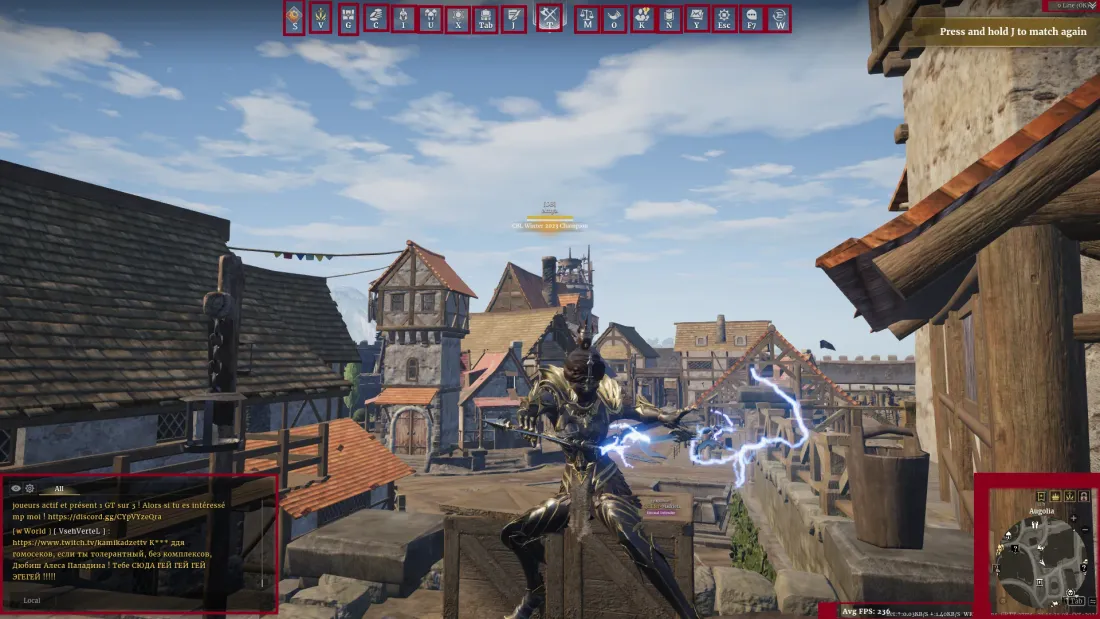
What does every button and menu do?
As with any MMO, take a few minutes to open each menu and get familiar. It saves you a lot of “I wish I knew this sooner” moments. Keybinds may differ from yours, so go by the menu, not the letter.
- S
- Appears during special events, usually farming resources for a global pool in exchange for rewards.
- V
- Everything seasonal: battle pass, weekly challenges, the Season Challenge menu (change your seasonal focus to unlock units), the Campaign menu, the Seasonal Seal system, seasonal runes and the Seasonal Store.
- G
- Box Exchange menu. A time-limited box plus a permanent box you open with keys from activities, and an attire exchange with a pity system for duplicate skins.
- C
- The Store. The New Players and Returning Players packs are worth a look, the rest is typical and not too pay to win.
- I
- Your character page: reset stats, change runes, skins (Character), your mount (Mount), abilities (Skills) and performance stats (Career).
- U
- All your units: equip doctrines, choose veterancy paths, level units and preset your warband. Some units require unlocking others first.
- X
- The Doctrines menu: excavate with treatises or use the Doctrine Alchemy system. Check the bottom of the menu for the exchange button.
- Tab
- Your inventory.
- J
- Current quests and weekly objectives. Do as many as you can (bandit raids, crafting, fief quests). Daily quests can reset twice a day, so make the most of it.
- T
- Your main button to start game modes, see upcoming events and begin tutorial missions.
- O
- Crucial for new and returning players: progress pass and daily login rewards, plus Activities (exchange Territory War tokens, Mastery Scrolls and Supply Tokens) and News.
- K
- Friends list, create or join groups.
- N
- The House menu.
- Y
- Your mailbox, check it for messages and rewards.
- Esc
- Options: settings and keybindings.
- F7
- Same menu as O (progress pass, rewards, activities).
- W
- Support and live assistance.
- Top Right (Line Menu)
- The game splits players into parallel worlds. If you cannot see friends, switch to the same line.
- Bottom Right
- Map and FPS/Ping. The minimap is very customizable: circular for close awareness, square for the wider area.
- Bottom Left
- Chat window. Hide local chat, disable world chat or make alliance/whisper channels to suit your playstyle.